
After upgrading ClearPass to 6.12.8, SAML SSO login to the Admin interface stopped working. The fix for that turned out to be disabling TLS 1.3 — which then broke EAP-TLS/EAP-TEAP authentication for a chunk of our clients. Untangling that took a wrong turn before we landed on the actual fix, so here’s the whole chain: what the upgrade broke, what we tried that didn’t work, and what actually fixed it.
The setup
- ClearPass upgraded to 6.12.8
- SAML SSO configured for Admin login
- EAP-TLS / EAP-TEAP in use for client authentication, including TPM-backed certificates on Intune-managed Windows devices
The trigger: the 6.12.8 upgrade broke Admin SSO
Post-upgrade, Admin SAML SSO login simply stopped working.
The fix pointed to how ClearPass was negotiating TLS 1.3 with the IdP — the documented remedy is to disable TLS 1.3 support in ClearPass.
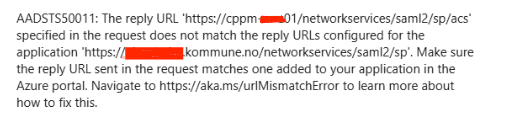
What we see here is that ClearPass is sending the hostname field rather than the FQDN field to Microsoft.
This causes the Microsoft login page to throw a reply URL mismatch error
Attempt 1: Disable TLS 1.3 for Admin only
Under ClearPass admin settings there’s a “Disable TLSv1.3 support” option that can be scoped — we set it to Admin only, leaving TLS 1.3 enabled everywhere else.
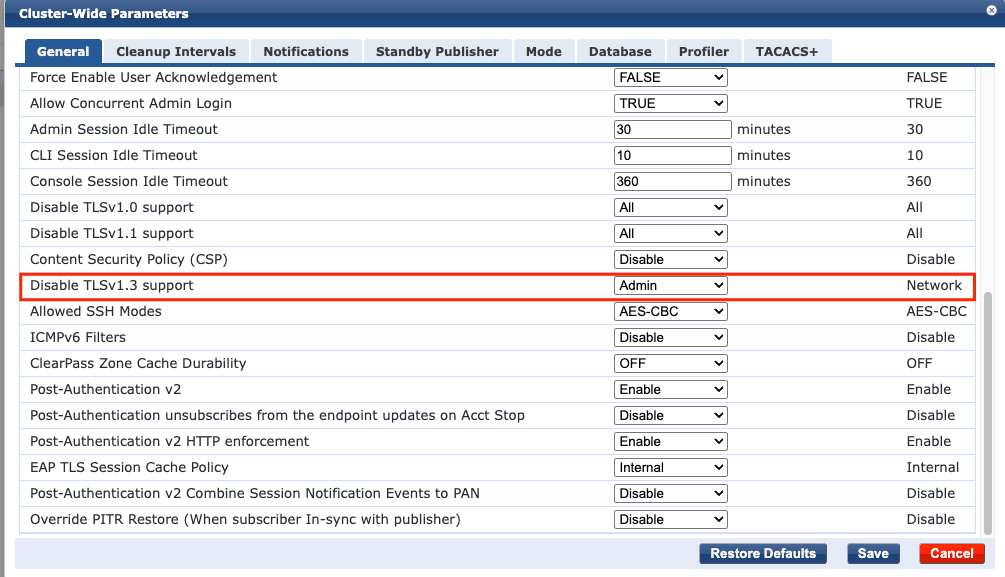
This fixed SAML SSO. But combined with ClearPass’s default RADIUS/EAP-TLS setting — “Disable RSA-PSS Signature Suite in EAP-TLS” left at its default of False — it broke EAP-TLS/EAP-TEAP authentication for a lot of clients, specifically TPM-backed certs on our Intune-managed Windows fleet (referenced in HPE case CP-49353).
Devices that had been authenticating fine started failing with signature algorithm negotiation errors, showing up in ClearPass’s Access Tracker as:
eap-teap: Method 2 failed for transaction
EAP-TLS: fatal alert by client - access_denied
eap-tls: Error in establishing TLS session
eap-teap: User authentication failed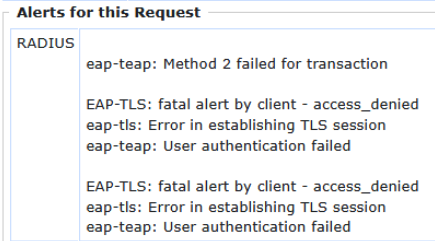
Attempt 2 (dead end): Registry workaround on the client side
The documented workaround for CP-49353 is a client-side registry edit — stripping the RSA-PSS entries from:
HKLM\SYSTEM\CurrentControlSet\Control\Cryptography\Configuration\Local\SSL\00010003…while keeping PKCS1/ECDSA entries, to force affected devices onto TLS 1.2.
This did not work for us. A lot of clients remained broken even after applying it.
The real fix (for us) was server-side.
The actual fix
Two settings on ClearPass, together:
- “Disable TLSv1.3 support” → set to All (not just Admin)
- “Disable RSA-PSS Signature Suite in EAP-TLS” (RADIUS/EAP-TLS service setting) → set to True
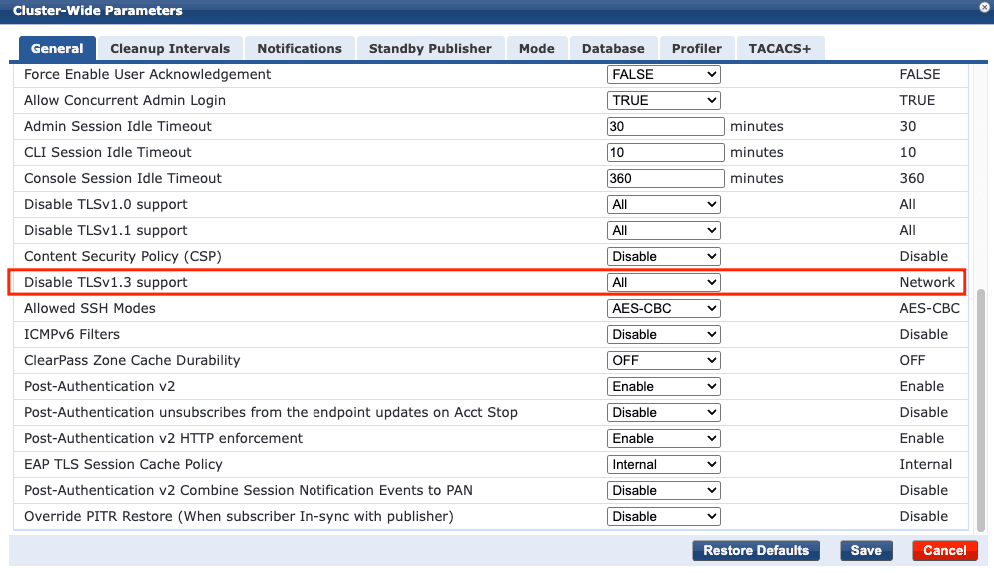

This combination resolved both problems at once — SAML SSO kept working, and EAP-TLS/EAP-TEAP authentication came back for the previously-failing TPM-backed devices. No client-side changes needed; the registry workaround mentioned elsewhere didn’t work for us at all.
Why this seems to work
TLS 1.3 introduces RSA-PSS as a signature scheme, and some TPM-backed certificate flows don’t negotiate it cleanly against ClearPass — narrowing the scope of the TLS 1.3 disable to “Admin only” wasn’t enough, because the EAP-TLS service was still willing to offer RSA-PSS by default. Disabling TLS 1.3 globally and explicitly turning off the RSA-PSS signature suite for EAP-TLS removes the problematic negotiation path entirely, rather than trying to selectively patch around it per device.
Don’t stop at the workaround — fix the fleet
Disabling TLS 1.3 and RSA-PSS on ClearPass gets you working, but it’s a workaround, not a real fix — it papers over devices that can’t do RSA-PSS properly rather than addressing why. The root cause is old TPM firmware: TPM chips need to be on TPM 2.0 firmware to handle RSA-PSS signature suites correctly under TLS 1.3. If you’re carrying older devices in the fleet, this is worth treating as a prompt to chase down TPM firmware updates rather than leaving TLS 1.3/RSA-PSS disabled indefinitely. Once the fleet is current, you can safely turn TLS 1.3 and RSA-PSS back on in ClearPass and get the security benefits you disabled here.
One way to definitively confirm whether a device is affected is to run this PowerShell command as admin on the client itself:
(Get-CimInstance -Namespace "root\cimv2\security\microsofttpm" -Class Win32_Tpm).SpecVersionThis returns three comma-separated numbers — spec family, level, and revision (e.g. 2.0, 0, 1.16). Family and level are normally always 2.0 and 0; what actually matters is the revision. 1.16 and older don’t handle RSA-PSS correctly — you want anything higher, commonly seen as 1.38 or 1.59.
TL;DR
If Admin SAML SSO broke after upgrading to ClearPass 6.12.8, and disabling TLS 1.3 for Admin then broke EAP-TLS on TPM-backed devices (CP-49353): skip the client-side registry workaround, it doesn’t hold. Set Disable TLSv1.3 support = All and Disable RSA-PSS Signature Suite in EAP-TLS = True on ClearPass, and move on — then put updating your fleet to TPM 2.0 firmware on the roadmap so you can eventually turn both back on.